🟢 Beginner: Broken Echoes#
The Echo Server is misbehaving. Both environments seem to be down, and messages are silent. Your mission: investigate the ArgoCD configuration and restore proper multi-environment delivery.
⏰ Deadline#
Wednesday, 10 December 2025 at 09:00 CET
ℹ️ You can still complete the challenge after this date, but points will only be awarded for submissions before the deadline.
📝 Solution Walkthrough#
⚠️ Spoiler Alert: The following walkthrough contains the full solution to the challenge. We encourage you to try solving it on your own first. Consider coming back here only if you get stuck or want to check your approach.
Need help restoring multi-environment delivery? Follow the step-by-step beginner solution walkthrough to learn how to:
- Investigate the Argo CD ApplicationSet and spot common pitfalls
- Adjust the Argo CD ApplicationSet to meet the challenge objective
- Understand the reasoning behind each change, not just the commands
The guide is written to explain not just what to do, but why. Dive in and level up your GitOps skills!
💬 Join the discussion#
Share your solutions and questions in the challenge thread in the Open Ecosystem Community.
🎯 Objective#
By the end of this level, you should:
- See two distinct Applications in the Argo CD dashboard (one per environment)
- Ensure each Application deploys to its own isolated namespace
- Make the system resilient so Argo CD automatically reverts manual changes made to the cluster
- Confirm that updates happen automatically without leaving stale resources behind
🧠 What You'll Learn#
- How Argo CD ApplicationSets work
- How to reason about templating and sync policies
- How drift detection and self-healing operate in GitOps workflows
🧰 Toolbox#
Your Codespace comes pre-configured with the following tools to help you solve the challenge:
kubectl: The Kubernetes command-line tool for interacting with the clusterkubens: Fast way to switch between Kubernetes namespacesk9s: A terminal-based UI to interact with your Kubernetes clusters
✅ How to Play#
1. Fork the Repository#
- Click the "Fork" button in the top-right corner of the GitHub repo or use this link.
2. Start a Codespace#
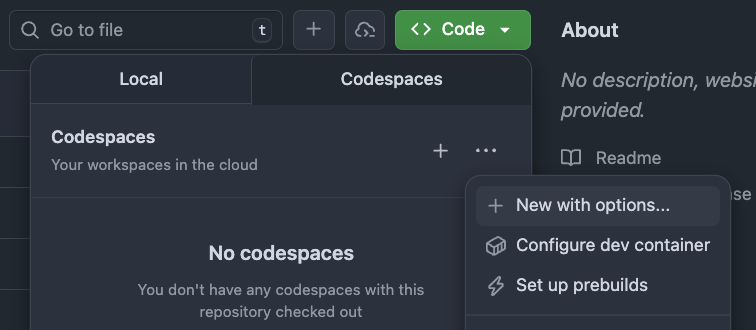
- From your fork, click the green Code button → Codespaces hamburger menu → New with options.
- Select the Adventure 01 | 🟢 Beginner (Broken Echoes) configuration.
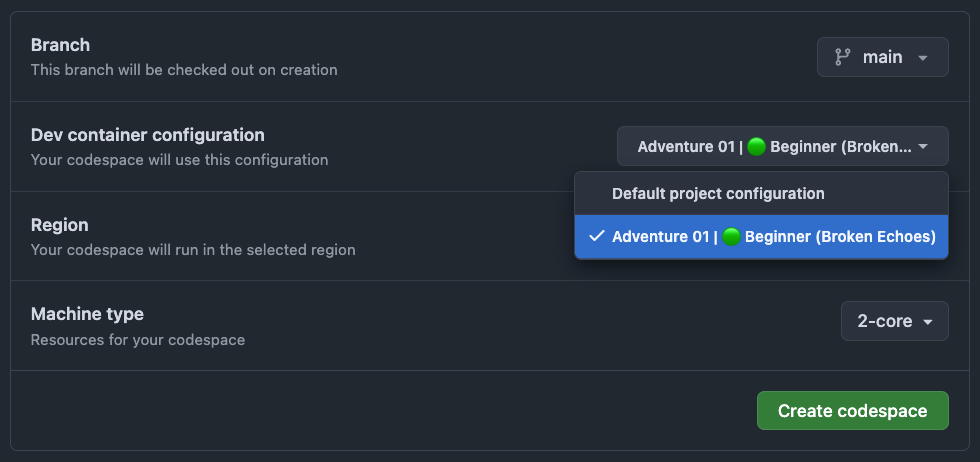
⚠️ Important: The challenge will not work if you choose another configuration (or the default).
3. Wait for Infrastructure to Deploy#
- Your Codespace will automatically provision a Kubernetes cluster, Argo CD, and the sample app. This usually takes around 5 minutes.
💡 Tip: To check the progress press
Cmd + Shift + P(orCtrl + Shift + Pon Windows/Linux) and search forView Creation Log(available after a few moments once the Codespace has initialized).
4. Access the Argo CD Dashboard#
- Open the Ports tab in the bottom panel
- Find the Argo CD row (port
30100) and click the forwarded address

- Log in using:
Username: readonly
Password: a-super-secure-password
5. Fix the Configuration#
- All errors are located in this ApplicationSet:
adventures/01-echoes-lost-in-orbit/beginner/manifests/appset.yaml - Learn more about ApplicationSets and the Application Specification in the ArgoCD docs.
📦 About Kustomize: This challenge uses Kustomize under the hood to manage Kubernetes manifests. Kustomize allows us to maintain a base set of manifests (deployment, service) and apply environment-specific customizations through overlays (staging, prod). Each overlay can modify the base configuration—like changing replica counts or namespaces—without duplicating YAML. Argo CD automatically detects and applies these Kustomize configurations, so you don't need to run Kustomize commands manually. Your focus is on fixing the ApplicationSet to properly reference these Kustomize-managed paths.
- After making changes, apply them:
(Run from the repo root)
kubectl apply -n argocd -f adventures/01-echoes-lost-in-orbit/beginner/manifests/appset.yaml
6. Verify Your Solution#
Once you think you've solved the challenge, it's time to verify!
Run the Smoke Test#
Run the provided smoke test script from the repo root:
adventures/01-echoes-lost-in-orbit/beginner/smoke-test.sh
If the test passes, your solution is very likely correct! 🎉
Complete Full Verification#
For comprehensive validation and to officially claim completion:
- Commit and push your changes to your fork
- Manually trigger the verification workflow on GitHub Actions
- Share your success with the community
📖 Need detailed verification instructions? Check out the Verification Guide for step-by-step instructions on both smoke tests and GitHub Actions workflows.